

Windows 11 Build 26220.7051 is now rolling out to testers in the Insider Program and introduces at least three new features, including an Ask Copilot button on the taskbar.
Until now, you could access Copilot in Windows 11 through the standalone app or a web browser. With this update, you can use a new taskbar-based Ask Copilot entry point to interact with the AI directly from the desktop.
This new Copilot-powered taskbar search experience is expected to eventually replace the current Windows Search interface.
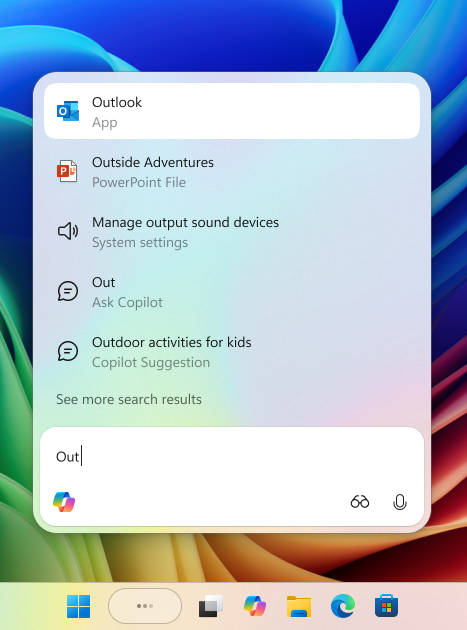
For the time being, Ask Copilot remains an optional feature that you must manually enable.
You can use the taskbar Copilot entry to search online content, local files, and AI-generated answers using both text and voice.
Microsoft notes that as you type, results appear and update instantly, making it simpler and faster to find what you are looking for. The company hopes that Copilot will evolve into a natural, everyday way of using your PC.
To enable Ask Copilot, go to Settings > Personalization > Taskbar > Ask Copilot.
New Xbox Full-Screen Experience for All Users
If you own a handheld Windows gaming device, you can now try the new Xbox full-screen experience (FSE), which was previously limited to the ASUS ROG Xbox Ally and ROG Xbox Ally X.
According to Microsoft, the full-screen experience improves Windows performance for gaming and helps you stay focused on your games without desktop distractions.
To turn on the Xbox FSE, open Settings > Gaming > Full screen experience, then select Xbox as your home app.
Once enabled, you can launch the full-screen experience from Task View or the Game Bar, or set your handheld device to start in full-screen mode automatically when it powers on.
Shared Audio Support for Bluetooth
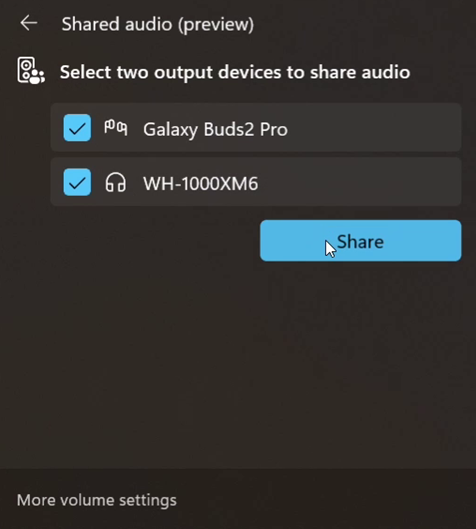
Microsoft is also adding a new shared audio feature built on top of Bluetooth LE Audio broadcast technology.
With this update, Windows can transmit a single audio stream to two Bluetooth devices at the same time, allowing two people to listen together on separate headsets or earbuds.
You can enable the new “Shared audio (preview)” shortcut from the quick settings panel to start sharing audio.
Performance Improvements for ARM PCs
The update also brings performance improvements to ARM-based Windows PCs.
Microsoft has expanded support for additional 64-bit x86 (x64) applications under emulation by adding more CPU features to the emulation layer. This allows a broader range of apps to run and can lead to noticeably better performance on ARM devices.
These new features are expected to roll out to all users over the coming weeks. If you want to try them immediately, you can join the Beta or Dev Channel of the Windows Insider Program.