

Mozilla has announced a major privacy upgrade in Firefox 145 that further reduces the number of users vulnerable to digital fingerprinting.
The new defenses will first be available only in Private Browsing Mode and in Enhanced Tracking Protection (ETP) Strict mode. After a period of testing and optimization, Mozilla plans to enable these protections by default in the standard Firefox browser.
What Is Browser Fingerprinting?
Fingerprinting is a tracking method that allows websites to monitor users’ browsing activity and identify them across different sites and browsing sessions, even when cookies are blocked or private browsing is enabled.
Subtle details such as time zone, hardware specifications, and browser configuration can be combined to form a unique digital signature that identifies users online.
This type of data can include your browser version, operating system, screen resolution and color depth, system language, installed fonts, time zone, GPU rendering behavior, number of CPU cores, touchscreen capabilities, and device memory.
Existing Anti-Fingerprinting Protections
Firefox’s existing anti-fingerprinting system is part of its Enhanced Tracking Protection mechanism. It blocks many known tracking and fingerprinting scripts, most of which are highly invasive and unrelated to improving the user experience.
Since 2021, Firefox has been gradually expanding its fingerprinting protections to cover the most common techniques, including factors such as how your graphics card renders images, which fonts are installed on your computer, and even tiny differences in how your system performs mathematical operations.
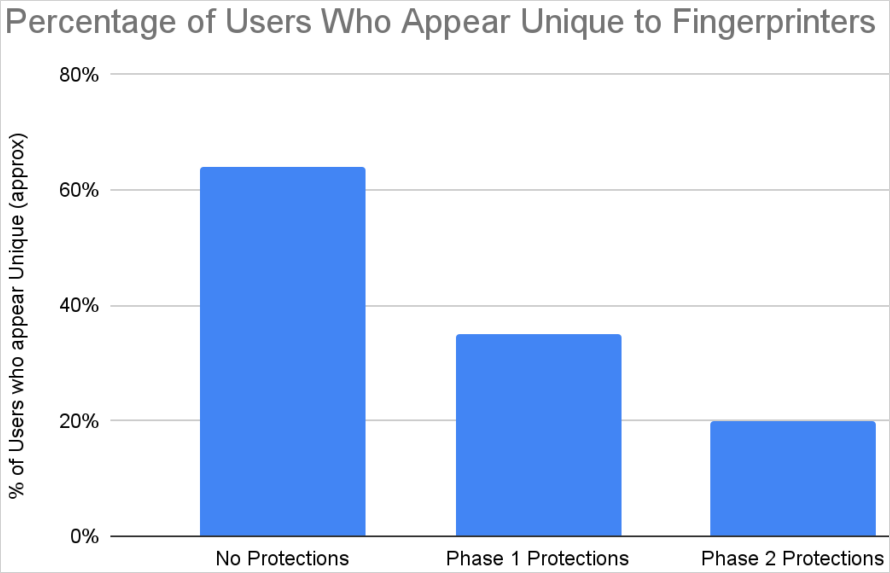
These earlier measures, labeled as “Phase 1 Protections,” reduced user trackability to about 35%, compared with roughly 65% when no protections are applied.
New “Phase 2” Fingerprinting Defenses
Mozilla is now rolling out “Phase 2” protections, which block more ways for websites to collect identifying information. These include blocking attempts to detect installed fonts, hardware details, number of processor cores, multi-touch support, and the size of the dock or taskbar.
The new protections specifically include the following measures:
- Random noise is added to background images only when a site reads the image data back, not when the images are merely displayed.
- Only standard operating system fonts are exposed; local fonts are blocked, except for critical language fonts such as Japanese, Thai, Arabic, Chinese, Korean, and Hebrew.
- Touch support is reported only as 0, 1, or 5 points of contact.
- The available screen resolution is reported as the actual screen height minus 48 pixels.
- The number of processor cores is always reported as 2.
With these additional measures in place, only about 20% of users can still be uniquely fingerprinted and persistently tracked.
Source: Mozilla
Balancing Privacy and Usability
Mozilla explains that it cannot simply block all potential fingerprinting vectors, as doing so would cause serious usability problems and break legitimate website features.
Many productivity tools and online services depend on accurate, real-time system and location data to function properly. As a result, Mozilla must maintain a limited channel for this data, even as it continues to narrow the amount of information that sites can access.
Users who experience issues with the new protections have the option to disable them for specific websites where functionality is affected.
Firefox 145 Release Details
Firefox 145 is scheduled for official release tomorrow. Users who prefer not to wait can already download the installer for their operating system directly from Mozilla’s distribution servers.
This is also the first Firefox release that does not include a 32-bit Linux version. Mozilla decided to discontinue 32-bit Linux builds because demand has fallen to a level that no longer justifies the cost of development and testing.