


Modern car safety systems have saved countless lives and continue to improve every year. They help prevent accidents, but sometimes they are implemented in ways that can be distracting or even counterproductive. As a result, many owners want to know whether they can switch these systems off, and how to do it if that is possible.
Why focus on the 2026 Mercedes CLA C174?
In a previous article, we explained the reasons these systems exist and why modern vehicles emit so many alerts. Here, and in a wider series, the focus shifts to practical steps: how to disable specific assistance features in particular models. Every manufacturer integrates driver aids differently, so this guide looks at how to turn off distracting functions in the 2026 Mercedes CLA C174.

Disabling traffic sign recognition in the Mercedes CLA
The process for turning off traffic sign recognition in the CLA is pleasantly simple. Once you start the car, a small icon showing a traffic sign appears at the top left of the central screen. The system is switched on by default and reactivates every time you lock and unlock the vehicle.
This design offers an easy way to disable a mandatory feature that might otherwise be irritating, especially if it constantly beeps and lowers your audio volume while driving.
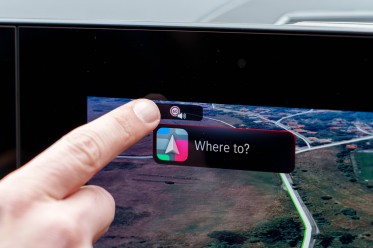

Simple to turn off the traffic sign recognition system
Turning off lane keep assist and other systems
Disabling additional driver assistance features requires a few more steps. In the lower row of permanent buttons beneath the central display, there is an icon depicting a car. Press this button to open a dedicated menu for the assistance systems.
From this menu, you can select which features you want to deactivate at that moment, including lane keep assist, traffic sign recognition and other safety aids.
You can then tap the settings icon to open a more detailed configuration screen. There you can adjust all available safety features to your preference. While this method is not quite as direct as the single traffic-sign button, it remains fairly intuitive and straightforward to use.
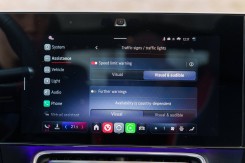
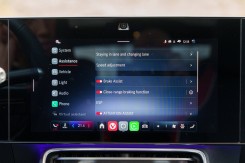
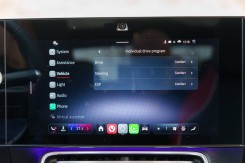
Extensive customization options for the safety systems
Looking ahead: more guides to modern driver aids
This article is part of an ongoing series explaining how to easily enable or disable the assistance features in modern vehicles. As regulations become more complex and systems more tightly integrated, simple guides can help drivers tailor safety technology to their needs while staying compliant with local laws.